1. Tags/

Visual Studio

So many new (.NET) goodies!

The people over at Microsoft have been working hard and have delivered a lot of stuff. That makes for a nice start after the holidays! So there’s a lot of cool stuff available to play with. I created some simple and easy to remember links for all of these goodies. Feel free to use and distribute these 🙂

Unable to find specific NuGet packages after update

·1 min

After updating Visual Studio 2015 (there was an update for GitHub Extensions, one for the NuGet Package Manager and, of course, there was Visual Studio 2015 Update 2) I tried to add the WindowsAzure.Storage NuGet package to a project I started about a month ago. I opened NuGet Package Manager, went to the Browse tab and typed WindowsAzure.Storage. The result: No Packages Found. OK, so then I’ll just….

Running Visual Studio as an administrator causes ‘Save changes to devenv.sln’ when double clicking solutions

·1 min

After making sure my Visual Studio always ran as an administrator by following my own post HowTo: Have Visual Studio always run as administrator on Windows 8, I got a message if I wanted to save changes to devenv.sln each and every time I double clicked a Solution. Since the problem kept occuring after installing Visual Studio 2015 CTP6, I wanted to solve it. So here we go!

Error saving Galileo Wiring App in Visual Studio

·1 min

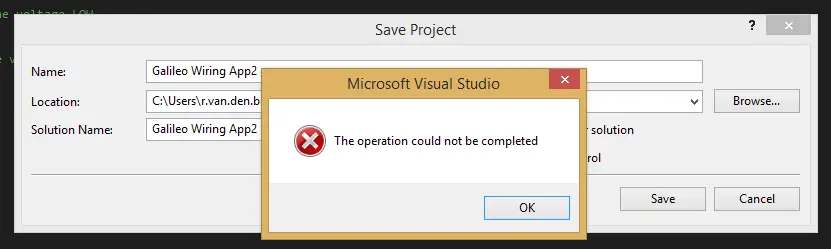
Last week I received my Intel Galileo board (windowsondevices.com) and I started playing with developing for it yesterday. I created a first test project, but it didn’t run. Visual Studio couldn’t find the Arduino header file, which was probably due to a missing NuGet package (the Galileo C++ SDK). I tried to save the project, because you need to before you can manage NuGet packages, but to no avail. Visual Studio served me a ‘The operation could not be completed’ error without any additional information.][2]

HowTo: sign out of Visual Studio Online (when deleting cookies won’t help)

When you have more than one Microsoft Account that you use regularly, you might recognize the scenario where your Visual Studio keeps you signed in to Visual Studio Online… with the wrong account. You keep getting messages that you don’t have access rights. Restarting Visual Studio, rebooting and even clearing all (Visual Studio) cookies doesn’t help. Here’s a quick fix:

Error: The Path ‘path’ is already mapped in workspace ‘workspace’

Just a quick little post today: I got the error “The Path ‘path’ is already mapped in workspace ‘workspace’” when I connected to a new Team Foundation Server and tried to map my workspace today. I had connected to a Team Foundation Services project a while back to get some shared code, but I already removed the workspace and the server binding. Even though Visual Studio didn’t see any other bindings, mapping my workspace to the same folder the previous TFS binding was mapped to served me this error.

Visual Studio 2012 crashes when opening an ASP.NET MVC project with a cshtml open

A rather long title for this post, but that’s exactly what happened: when I opened an ASP.NET MVC 4 project with a cshtml view open, Visual Studio would crash with the error messages seen on the right. This would only occur if the first project I opened had a cshtml file open. When I opened another (type of) project first and then opened a project with a cshtml file open, the problem did not occur. Debugging Visual Studio with a new instance of Visual Studio (Inception anyone?) made things a bit clearer. (Part of) the exception information:

Debugging JavaScript with Visual Studio in an ASP.NET MVC 4 application

When debugging JavaScript in an ASP.NET MVC (4) application, it is not always enough to uncheck the ‘Disable script debugging’ checkboxes under ‘Tools’ – ‘Internet Options’ – ‘Advanced’ – ‘Browsing’. JavaScript inside a Razor view (a cshtml file) cannot be debugged from Visual Studio. To debug your JavaScript, move it to a separate .js file and link to that file from your Razor view. This way, breakpoints set in the JavaScript will be hit and you can debug from Visual Studio.