Techdays 2014 The Netherlands
·1 min
As I wrote earlier I presented at the 2014 Dutch Techdays. The session content is now available online. Find it here (Dutch):


As I wrote earlier I presented at the 2014 Dutch Techdays. The session content is now available online. Find it here (Dutch):
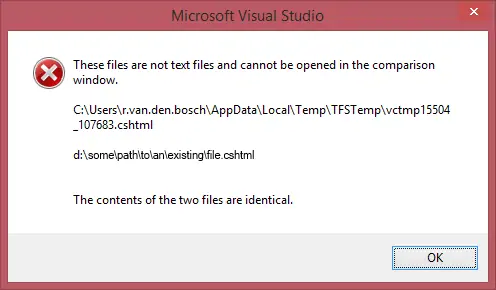
When working with Visual Studio 2012 on our current project, the error ‘These files are not text files and cannot be opened in the comparison window.’ shows up every now and again. I’ve tried several things to solve this problem.
There are a couple of websites I manage that use Twitter Bootstrap*. These websites are fully responsive and work well on all devices. Or actually, almost all devices. The wrapping of columns in a container on a Windows Phone doesn’t work the way you’d want it out of the box. Windows Phone interprets device-width as the actual resolution size. Other mobile browsers use what the manufacturer (or browser vendor) has decided is the optimal viewport width.
I’m proud to announce that this year I’ll be speaking at the TechDays in the World Forum in Den Haag, April 16 – 17. This session will be about High Performance Computing in Windows Azure.
Bloggingabout.net has moved from Community Server to WordPress. One of the changes that comes along with this is that the URL of my blog has changed too. I went from bloggingabout.net/blogs/rick to rick.bloggingabout.net.
When you have more than one Microsoft Account that you use regularly, you might recognize the scenario where your Visual Studio keeps you signed in to Visual Studio Online… with the wrong account. You keep getting messages that you don’t have access rights. Restarting Visual Studio, rebooting and even clearing all (Visual Studio) cookies doesn’t help. Here’s a quick fix:
Just a quick little post today: I got the error “The Path ‘path’ is already mapped in workspace ‘workspace’” when I connected to a new Team Foundation Server and tried to map my workspace today. I had connected to a Team Foundation Services project a while back to get some shared code, but I already removed the workspace and the server binding. Even though Visual Studio didn’t see any other bindings, mapping my workspace to the same folder the previous TFS binding was mapped to served me this error.
A rather long title for this post, but that’s exactly what happened: when I opened an ASP.NET MVC 4 project with a cshtml view open, Visual Studio would crash with the error messages seen on the right. This would only occur if the first project I opened had a cshtml file open. When I opened another (type of) project first and then opened a project with a cshtml file open, the problem did not occur. Debugging Visual Studio with a new instance of Visual Studio (Inception anyone?) made things a bit clearer. (Part of) the exception information:
Just a quickie today: when working with Twitter Bootstrap tabs, like I am in my ASP.NET MVC 4 project, you might want to add Next and Previous buttons on the tabs to create something of a Wizard. Here’sa step by step overview of how I did this:
When debugging JavaScript in an ASP.NET MVC (4) application, it is not always enough to uncheck the ‘Disable script debugging’ checkboxes under ‘Tools’ – ‘Internet Options’ – ‘Advanced’ – ‘Browsing’. JavaScript inside a Razor view (a cshtml file) cannot be debugged from Visual Studio. To debug your JavaScript, move it to a separate .js file and link to that file from your Razor view. This way, breakpoints set in the JavaScript will be hit and you can debug from Visual Studio.
Problem:
Developing a generic class that maps datasets, datatables and datarows from a legacy system to my domain model, I ran into an issue. I wanted to call a generic method with a runtime type. Lets say the method looked like this: public string DoSomething<T>(string param). Because I use reflection to iterate properties on a type, the type of the properties was dynamic and only known at runtime. I wanted to do something like this: